Gears of Discovery
Game UI Systems & HUD Design (Unreal Engine 5)
ROLE
UI/UX Designer & Game Designer
Focus
HUD systems, Player Feedback, Gameplay Clarity
TOOLS
Unreal Engine 5, Blueprints, Procreate
Overview
Gears of Discovery is a 3D platformer focused on puzzle solving, resource management, and environmental navigation.
For this project, I designed and implemented a complete in game UI system including HUD, inventory, and player feedback using Unreal Engine 5 and Blueprints.
The goal was to create UI that clearly communicates player state and objectives in real time while remaining unobtrusive and integrated into the gameplay experience.
The Problem
Players are required to manage multiple systems simultaneously including health, stamina, collectible resources, and puzzle progression while navigating hazardous environments.
Without clear and well structured UI, players can easily become overwhelmed or miss critical information, especially during moments that require quick decision making.
The challenge was to design a UI system that communicates essential information instantly while minimizing screen clutter and maintaining focus on the gameplay environment.
My Role
Designed and implemented all UI/UX systems for the game
Created HUD, inventory system, and player feedback elements
Built and integrated UI directly in Unreal Engine 5 using Blueprints
Designed iconography and visual hierarchy for clarity and usability
Collaborated with a 6 person team using Agile workflows
Process
HUD System Design
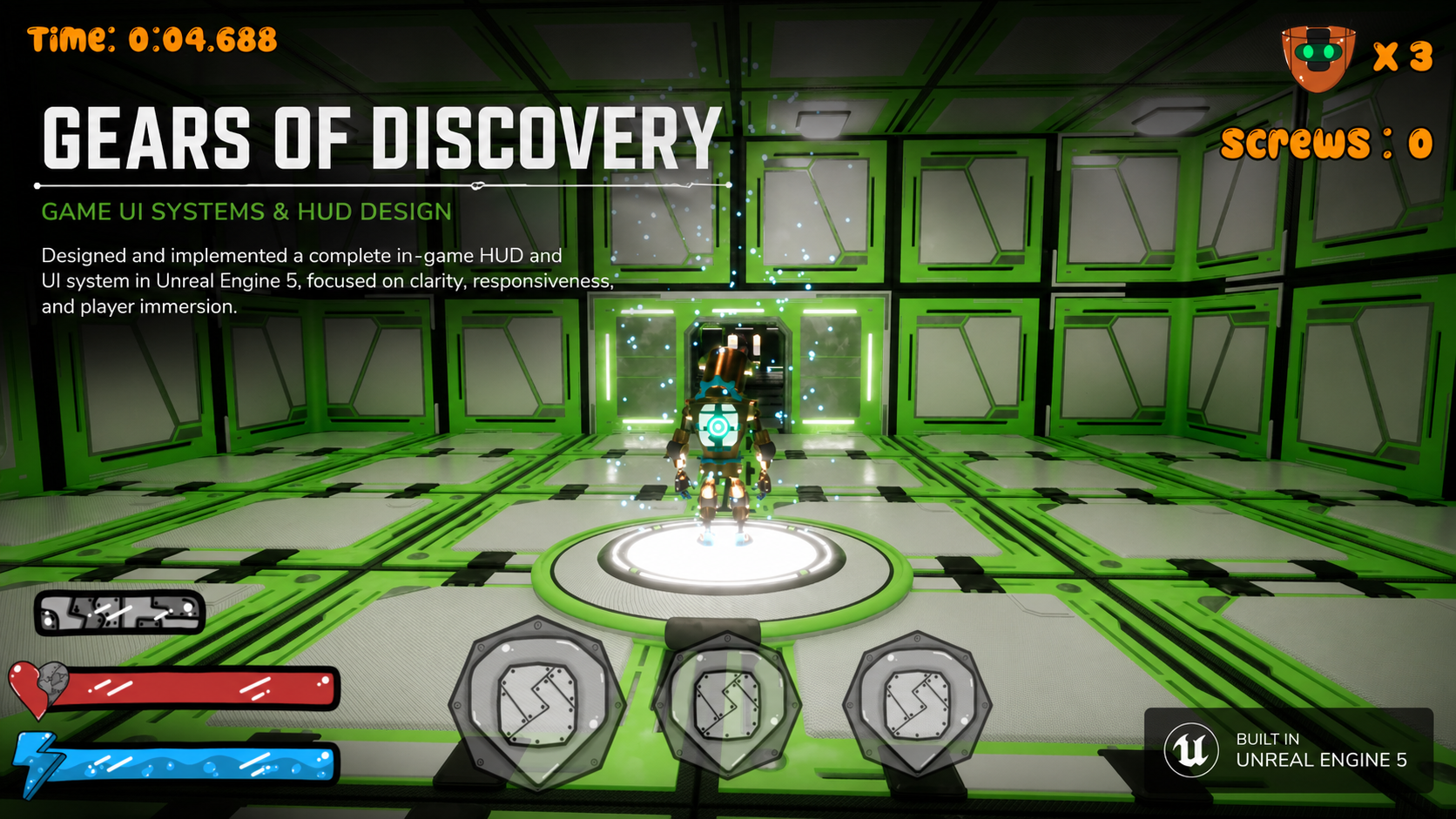
I designed a HUD system that surfaces key gameplay information including time, collectibles, player health, stamina, and inventory.
Each element was positioned based on priority and frequency of use. Health and stamina were placed in the lower left for quick peripheral visibility, while inventory slots were centered to reinforce their connection to player interaction.
Secondary information such as time and collectibles was placed at the top of the screen to remain visible without competing with core gameplay focus.
Player Feedback & Interaction Design
To support moment to moment gameplay, I designed feedback systems that communicate player state changes and environmental interactions.
For example, hazard areas such as spike traps create high pressure moments where players must quickly interpret their health and stamina levels. The UI reinforces this by providing clear, immediate feedback through dynamic health and stamina indicators.
Inventory feedback was also designed to clearly reflect item pickups and usage, allowing players to understand their current tools without needing to pause or navigate away from gameplay.
Visual Design & Readability
I developed a bold and highly readable visual style using strong outlines, color coding, and simplified iconography to ensure clarity across all gameplay scenarios.
Health, stamina, and inventory states are differentiated through distinct colors and shapes, allowing players to quickly interpret information even in fast paced or visually busy environments.
This approach ensures that UI remains legible at a glance without requiring focused attention.
Key Features
The following UI systems were designed to support real time gameplay, ensuring clarity, responsiveness, and minimal disruption to player immersion.
Player HUD & Core Gameplay Visibility
I designed a player HUD that communicates critical gameplay information including health, stamina, collectibles, inventory, and time progression.
The layout prioritizes readability and quick access, with high priority systems such as health and stamina placed within immediate peripheral view, while secondary information like collectibles and time is positioned at the top of the screen.
This structure allows players to stay focused on gameplay while still maintaining awareness of their current state.
Health & Stamina Feedback System
I designed dynamic health and stamina systems that update in real time based on player actions and environmental interactions.
Color differentiation and clear visual indicators allow players to quickly assess their survivability and available energy, especially during high pressure moments such as navigating hazards or platforming sequences.
This ensures players can make fast, informed decisions without needing to shift focus away from gameplay.
Inventory & Item Interaction System
The inventory system was designed to provide immediate visibility into player resources and active items.
Each slot clearly reflects item state through iconography and visual feedback, allowing players to quickly understand what tools are available and which item is currently active.
Positioning the inventory at the bottom center reinforces its connection to player actions while keeping it easily accessible without obstructing gameplay.
Impact
The UI system improved gameplay clarity by allowing players to quickly understand their status and available resources without interrupting gameplay.
During playtesting, players were able to navigate hazards and puzzles more confidently, with fewer instances of confusion around health, stamina, and item usage.
The combination of strong visual hierarchy and responsive feedback resulted in a more intuitive and engaging player experience.
Reflection
This project strengthened my ability to design UI systems that balance usability, readability, and gameplay immersion.
Working directly in Unreal Engine also gave me a deeper understanding of how UI connects to gameplay systems, allowing me to design solutions that are both visually effective and technically practical.
Moving forward, I would further explore motion design and subtle UI animation to enhance feedback and create a more polished and immersive experience.
UI Implementation in Unreal Engine
All UI systems were implemented directly in Unreal Engine 5 using Blueprints, allowing UI elements to dynamically respond to player actions and game state in real time.
This included health and stamina systems that update instantly based on player damage or energy usage, as well as inventory logic that reflects item collection and activation.
By building the UI within the engine, I was able to ensure seamless integration between gameplay systems and visual feedback.
Environmental Feedback & Hazard Awareness
To support moment to moment gameplay, I designed UI feedback that helps players interpret environmental threats and react quickly.
During hazard interactions such as spike traps, players rely on immediate feedback from their health and stamina systems to understand the consequences of their actions.
The UI reinforces these moments by providing clear and responsive feedback, allowing players to adapt and recover without confusion.
Instructional UI & Player Guidance
I designed instructional UI to introduce mechanics and guide players without overwhelming them.
The tutorial system uses clear, centered messaging combined with background blur to focus attention while still maintaining awareness of the game environment.
This approach allows players to quickly understand objectives and mechanics before returning to gameplay.